Digital Portfolio

Digital Portfolio

Images

Photography, retouching, compositing, and graphic design are all part of the creative toolbox. Here are a few examples of my image work.

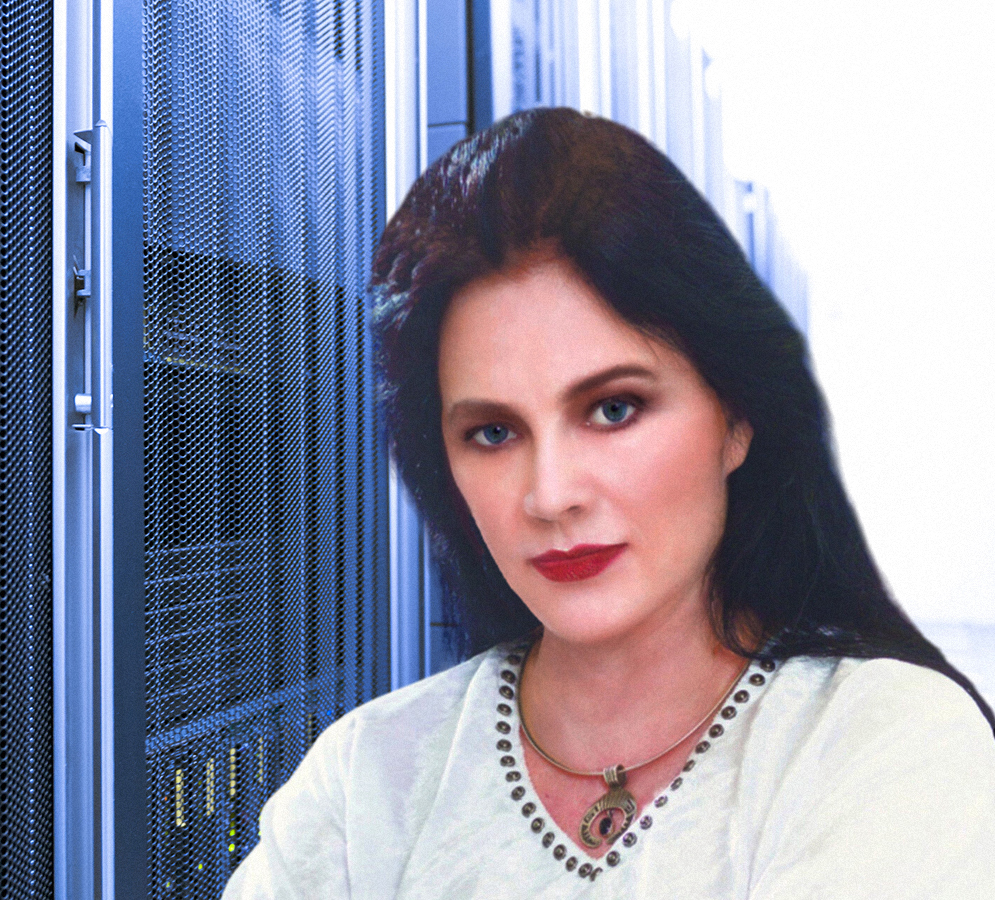
Portrait Retouching & Background Compositing

Sometimes I wind up doing as much work after the photograph is taken as went into taking it in the first place. I retouched this portrait myself and inserted the server-room background.

Created with Adobe Photoshop and other software.

Portrait of Sandra Wolff in a server room

Business Card Design

Front and back of my current business card, combining the visual identity of Dark Cloud with my own professional branding. Click either side for a closer look.

Created with Adobe Photoshop and other software.

Dark Cloud One Sheet

The One Sheet brings together the visual identity of Dark Cloud, including the pairing of Dark Cloud and Klaatu that also appears on the back of my business card. I created the overall design and assembled the imagery into the finished piece. Click the image to enlarge it.

Created with Adobe Photoshop and other software.

Cartoons, Satire & Visual Humor

I also enjoy exploring the lighter and occasionally downright ridiculous side of creativity! My Humor Gallery features original cartoon concepts, satirical illustrations, and comedic videos, combining my own writing, visual storytelling, and AI-assisted image generation.

From everyday absurdities to thoroughly improbable situations, I enjoy taking an idea and seeing just how far I can run with it.

Concepts, writing, creative direction, and visual development by Sandra Wolff.

Explore My Humor Gallery

Websites

I hand-code my websites in HTML, CSS, and JavaScript rather than using page builders. That approach allows for maximum portability between hosting providers, and maximum freedom to do anything. No cookie-cutter templates that look like everyone else's site! Here are a few examples of sites I've designed and built.

Dark Cloud Online

The official website for Dark Cloud, and probably my most ambitious web project to date. It brings together the graphic novel, screenplay, characters, visual development, and motion-picture work into one online home.

It even has a trailer, but we'll get to that later.

Hand-coded with HTML, CSS, and JavaScript.

Visit DarkCloudOnline.com

SandraWolff.com

My personal website and the home of this portfolio. I designed and built it as a central hub for my film, writing, visual, technical, and creative work.

Hand-coded with HTML, CSS, and JavaScript.

Visit SandraWolff.com

Thaine Allison Jr.

A client website created for actor Thaine Allison Jr., providing another example of my web design and development work outside my own projects.

For this site, Thaine gave me some fabulous sizzle reel footage — but it was in another format that didn't show nearly as large or as well as I felt it needed to be shown, so I converted the file format and created the .mp4 that his video demo page leads with.

Truly a remarkable actor with an incredible range...

Hand-coded with HTML and CSS.

Visit Thaine Allison's Site

De La Frontera Zone

I like playing with subtle visual effects. This page is a simple example: the ombré effect is created entirely in code rather than using a background image.

Hand-coded with HTML and CSS.

Visit DeLaFronteraZone.com

A little something I do for fun...

On a few of my websites, I build in selectable color themes - not because the site needs them, but because I enjoy giving visitors a choice. Click the buttons below and change the look of this site for yourself.

Videos

Video editing, sound design, visual effects, voice work, comedy, and AI-assisted filmmaking are all part of my digital toolbox. Here are a few examples of my work, ranging from the dramatic to the delightfully ridiculous.

Dark Cloud — Graphic Novel Trailer

Created to promote the Dark Cloud graphic novel, this trailer combines imagery, motion, editing, music, sound, and voice-over into a short introduction to the world of the story.

Video production and editing by Sandra Wolff.

Watch the Graphic Novel Trailer on YouTube

Dark Cloud — Proof-of-Concept / Sizzle Trailer

This is a proof-of-concept trailer for the motion-picture version of Dark Cloud, created as a demonstration of the characters, world, visual style, and cinematic possibilities of the project.

Coming soon! My mentor advised me not to provide an active link to anything that isn't ready to show a studio executive. I take her advice. She knows what she's doing.

The trailer will return once the remaining edits and soundtrack are completed.

Concept, production, editing, and visual development by Sandra Wolff.

Diatetics — Comedy Video Parody

And now for something completely different! A loving spoof of those wonderfully overdramatic television commercials from time past.

Introducing Diatetics, by L. Ron Blubbard: the self-help book you never knew you didn't need. Featuring the Modern Science of Mental Gymnastics. Because the bathroom is lonely.

Original comedy parody by Sandra Wolff.

Watch Diatetics — The Comedy Commercial

Software

I also develop software when an idea catches my interest or I see something I'd simply like to build. Here are a couple of examples — one ready to use, and one currently in development.

Contacts Custom Database

Contacts Custom Database is a CRM-style contact-management application I developed for organizing personal and professional contacts after I quickly realized how cognitively taxing it is to use a spreadsheet to organize text information on all of one's connections! Spreadsheets are not designed for that, and the navigational keys don't work the same as in a word-processing document. I just decided to go ahead and write an application for myself that would handle all that. The result provides a straightforward way to maintain contact information and related details in a locally stored database.

The first version of this app was a Windows desktop application only, but then I started getting asked if I code for macOS and Apple in general. I was saying no, until I realized that most people asking were indeed using Macs of one sort or another. [This is the Entertainment Industry, after all, and Apple beat IBM architecture to the creativity arena. Even though the playing field has leveled, people tend to stick with what they got used to working with.] I did some research, installed Avalonia into Visual Studio and started translating my code to C#. With some hoop-jumping I went ahead and set up an account to occasionally use a Mac in the Cloud for the purposes of final testing and creation of the executable files I pass around for Apple architecture machines. Given that I give this stuff away for free I don't exactly see a justification to buy a Mac just for testing and compiling the executables at this time.

I considered developing a companion phone app for collecting contact information while away from the computer, but there are already customizable database apps available for smartphones that handle that part of the job very well. Still, maybe someday I will. In the meantime here are some recommendations for phone apps that complement this app, below.

Using it with your phone: Apps such as Memento Database and Custom Data Recorder allow you to create your own data-entry forms on a smartphone. This makes it easy to collect names, phone numbers, email addresses, companies, notes, and other information as you meet people at conventions, networking events, meetings, or while traveling.

When you're finished, simply export the collected information as a CSV file and transfer or email the file to your computer. The Append Another File to a Database feature in Contacts Custom Database can then open the exported file, let you match its fields to the appropriate fields in your contacts database, and append the new records to an existing database of your choice.

The field names used by the phone app do not even have to match the fields in Contacts Custom Database. During the append process, you can choose which incoming field goes where and exclude fields you don't want to import.

Since existing mobile apps already do most of the portable data-entry work, I decided that writing and maintaining a separate phone version would mostly duplicate functionality that is already available. It's simpler to collect the information on the phone, export the file, and let Contacts Custom Database handle it from there.

I may eventually provide a ready-made contact form or template that can be imported into one of these mobile database apps, making the process even easier to set up.

There are certainly plenty of CRM applications available, including free ones. This one exists because I wanted to build it — and because sometimes the best way to demonstrate that you can develop software is simply to develop software.

This app is designed to run as though dark mode is your default. It's easy on the eyes if you're a night owl like me. If you really want a light version please let me know. I may make a light version available if I find out people want it.

Free for individual use. Help yourself. All I ask is that you respect the copyright and leave my authorship intact.

Note: This application has not been digitally signed. Windows or macOS may display a security warning when you first open it and ask you if you want to continue. Long story short: The app is safe. I've just got hoop-jumping to do with Microsoft before Windows operating systems blankly accept my apps, and Apple isn't any kinder about it. In the meantime, enjoy them anyway.

For Windows:

  1. Copy the downloaded .exe file into a folder of your choosing.
  2. Right-click the .exe file in Windows File Explorer.
  3. Select Show more options.
  4. Select Send to, then click Desktop (create shortcut).
  5. Double-click the new desktop shortcut to launch the application.

For Mac:

  1. Download the version appropriate for your Mac's processor (Apple Silicon or Intel).
  2. Double-click the downloaded .dmg file to open it.
  3. Copy CustomContactsMac.app into your Applications folder.
  4. Open the application from Applications. You can also drag its icon into the Dock or create a desktop alias.
  5. Because the application is not digitally signed or notarized by Apple, macOS may display a security warning. If you trust the download, attempt to open the app, then go to System Settings → Privacy & Security and select Open Anyway.

Download Contacts Custom Database for Windows

Download Contacts Custom Database for Apple Silicon (M1, M2, M3... newer)

Download Contacts Custom Database for Intel Mac (Usually pre-2020)

Designed and programmed by Sandra Wolff.
SunStone

SunStone is a Windows compatible calendar-conversion application designed to translate dates between the conventional Western calendar and the Mayan calendar, in either direction. They honestly had a different system that really only lines up with itself every 52 years — but it is fascinating to look at how the Haab and Tzolk'in calendar rounds interact with each other while being internally cyclical...

I started the project some time back and eventually set it aside. Now I've come back and finished what I originally set out to do. Right now it's just for Windows, but I will probably change that in the future, just like I did for the database app above. Drop me a line if you'd like to see it sooner. What people want is something I like to hear about.

Western Date to Maya Calendar and vice-versa — with a graphical interface that makes the conversion easy to explore. I've incorporated plenty of Mayan glyphs to illustrate exactly how any date would be represented visually; not just a dry text printout - and yes, that's my graphic work creating those glyphs, as well as the texture effect of the Jaguar / Water Lily image that you see in the screenshot here. I wanted something that looked like weathered, exposed stone tiles, discovered a cool effect, and kept the theme throughout the app. Then I stumbled across a beautiful work of art that was a more casual, yet still stylized jaguar with a water lily, and it inspired me to start creating and incorporating general imagery and design features into the app beyond just the glyphs and title image. I'm so glad I didn't stop at simple functionality. The result turned out to look wonderful!

Some day I'll expand it and get into the significances of the different days and how they all work together 'personality wise', but that's quite a project for another day.

Free for individual use. Help yourself. All I ask is that you respect the copyright and leave my authorship intact.

For Windows:

  1. Copy the downloaded .exe file into a folder of your choosing.
  2. Right-click the .exe file in Windows File Explorer.
  3. Select Show more options.
  4. Select Send to, then click Desktop (create shortcut).
  5. Double-click the new desktop shortcut to launch the application.

Note: This app has not been digitally signed. Windows may display a security warning when you first open it and ask you if you want to continue. Long story short: The app is safe. I've just got hoop-jumping to do with Microsoft before Windows operating systems blankly accept my apps. In the meantime, enjoy them anyway. Go ahead and copy the app to a folder of your choosing, then set up a shortcut on your desktop.

Download SunStone for Windows

Designed and programmed by Sandra Wolff.